캐릭터 시트 프롬프트: 복사해서 쓰는 AI 템플릿
LumiYing 캐릭터 시트 생성기가 기반으로 하는 프롬프트 구조입니다. ChatGPT, Gemini, Midjourney에 붙여 넣고 캐릭터를 채운 뒤, 턴어라운드·표정·의상용 변형도 활용하세요.
LumiYing업데이트
캐릭터 시트 프롬프트 전체 템플릿
[대괄호] 안의 내용을 내 캐릭터로 바꾼 뒤 프롬프트 전체를 ChatGPT나 Gemini에 붙여 넣으세요. LumiYing 생성기가 사용하는 규칙을 다른 도구용으로 옮긴 것입니다. 대부분의 이미지 모델이 영어를 가장 정확히 따르기 때문에 프롬프트는 영어로 둡니다.
전체 템플릿 (ChatGPT, Gemini)
Create a professional character reference sheet of [describe your character: role, age, build, hairstyle, outfit, colors, art style]. Reference: - Use any attached reference image as the source of truth for the design. - Apply only the changes described above and keep every other visible feature. - With no reference image, create one design and keep it identical across the sheet. Layout: - Clean, clearly separated panels with even spacing and thin dividers. - Full-body front, side, back and three-quarter views, a close-up portrait, and outfit, prop or accessory detail studies. - Make the full-body views largest; keep the portrait and details secondary. - Neutral background, readable lighting, clean silhouettes. Turnaround: - Orthographic views with minimal perspective, a neutral standing pose and an upright head. - Same body scale, one aligned ground line, and enough margin to show feet, ears and tail. - Front: exactly 0 degrees, head and torso square to the viewer, nose centered between the eyes. - Side: exactly 90 degrees, one eye in profile, face not turned toward the viewer. - Back: exactly 180 degrees, back of the head, no face visible. - Three-quarter: about 45 degrees, clearly different from the front and side. - The reference sets the design, not the angle or head tilt; never mirror one view to stand in for another. Consistency: - Same face, hairstyle, body proportions, outfit, colors, materials and art style in every panel. - Keep the head-to-body ratio and limb lengths, including stylized proportions. - Keep layered garments distinct, fastening counts the same, and asymmetric accessories on the same side. - Draw unseen surfaces, such as the back of the outfit, with the same construction. Avoid: - Unrelated characters, extra scenes, logos, watermarks, captions, labels or any other text.
이름을 넣으려면 "Show the name [Name] once, small, in a header above the panels."를 덧붙이세요.
Midjourney용 짧은 버전
character reference sheet of [your character], full-body front view, side profile view, back view and three-quarter view, close-up portrait, outfit and prop detail studies, orthographic turnaround, neutral standing pose, same design in every view, neutral background, clean panel layout, no text --ar 16:9
Midjourney는 짧은 키워드형 프롬프트에서 가장 잘 작동하므로, 뷰와 레이아웃만 남기고 세부 규칙은 뺐습니다.
템플릿을 채운 예시 3가지
아래 프롬프트는 모두 전체 템플릿에 캐릭터 설명만 채운 것입니다. 이미지는 같은 설명으로 LumiYing 생성기에서 만들었습니다.
애니메이션 / VTuber 캐릭터

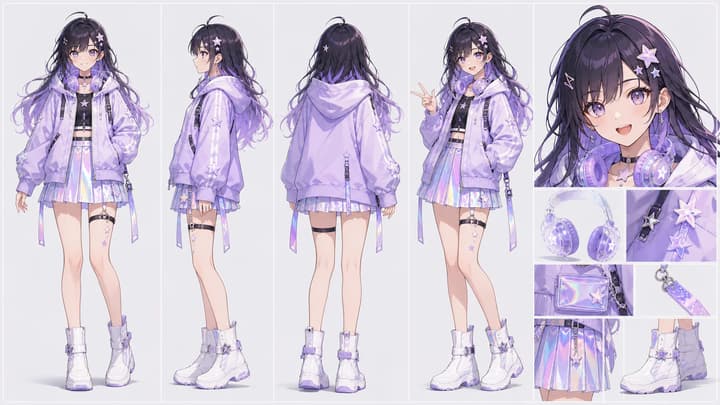
Create a professional character reference sheet of a stylish VTuber avatar in anime style: pastel lavender hoodie, translucent headphones, star hair clips, iridescent skirt, white ankle boots, cheerful expression.
+ 위 전체 템플릿의 나머지 부분머리핀과 헤드폰이 모든 뷰에서 같은 쪽에 있는지 확인하세요.
생성기에서 사용해 보기그림책 캐릭터

Create a professional character reference sheet of a cozy children's book protagonist in soft picture-book style: an adventurous girl with round glasses, yellow raincoat, red backpack, muddy boots and a curious smile.
+ 위 전체 템플릿의 나머지 부분가방과 우비 디테일이 앞뒤에서 일치하는지 확인하세요.
생성기에서 사용해 보기3D 액션 피규어

Create a professional character reference sheet of a premium action figure concept in clean 3D render style: a space rescue captain in a white and crimson pressure suit with a modular oxygen backpack and a rescue flare tool.
+ 위 전체 템플릿의 나머지 부분슈트 패널과 백팩 모듈이 턴어라운드 전체에서 일치하는지 확인하세요.
생성기에서 사용해 보기사이버펑크 캐릭터

Create a professional character reference sheet of a cyberpunk street racer in a sleek semi-realistic style: cropped neon-orange jacket, matte black motorcycle pants, reflective visor helmet under one arm, chrome gloves, electric blue hair, confident stance.
+ 위 전체 템플릿의 나머지 부분헬멧이 모든 뷰에서 같은 팔에 끼워져 있고 크롭 재킷이 일치하는지 확인하세요.
생성기에서 사용해 보기다른 종류의 시트용 템플릿
턴어라운드만, 표정 모음, 여러 의상, 기존 이미지로 만드는 시트 등 다른 시트가 필요할 때 사용하세요.
턴어라운드만
Create a character turnaround sheet of [your character]. Show four full-body views side by side: front (0 degrees), three-quarter (45 degrees), side profile (90 degrees) and back (180 degrees). Orthographic views, neutral standing pose, same scale, feet on one shared ground line. Keep the face, hair, outfit and colors identical in every view. Plain neutral background, no text.
추가 패널 없이 정면·3/4·측면·후면만 깔끔하게 나열할 때 사용하세요.
표정 시트
Create a character expression sheet of [your character]. Show the same head and shoulders in a 3x3 grid with nine expressions: neutral, happy, laughing, sad, angry, surprised, scared, thinking and embarrassed. Keep the face shape, hairstyle, eye color and art style identical in every panel. Even lighting, neutral background, no text.
얼굴이 조금씩 달라지면 표정 개수를 줄여 보세요.
의상 시트
Create a character outfit sheet of [your character]. Show the same character in [number] outfits, full-body front view for each, standing side by side at the same scale. Keep the face, hairstyle, body proportions and art style identical; change only the clothing and accessories. Add small detail studies of each outfit's key piece. Neutral background, no text.
의상은 3~4벌 정도로 줄여야 하나하나가 잘 보입니다.
참고 이미지로 만들기
Using the attached image as the source of truth, create a character reference sheet of this exact character. Keep the face, hairstyle, body proportions, outfit construction, colors and art style unchanged. Add a full-body front view, side view, back view and three-quarter view in a neutral standing pose, plus a close-up portrait. Reconstruct unseen surfaces, such as the back of the outfit, in the same design. Neutral background, no text.
프롬프트를 보내기 전에 캐릭터 전신이 잘 보이는 이미지 한 장을 첨부하세요.
프롬프트 각 부분의 역할
캐릭터 설명
역할, 체형, 헤어스타일, 의상, 색상, 그림체를 적으세요. 구체적인 디테일이 있어야 모델이 일관되게 유지할 기준이 생깁니다.
뷰와 패널
정면·측면·후면·3/4 뷰, 초상, 디테일을 나열하면 모델이 레이아웃을 임의로 만들지 않습니다.
정확한 각도
0·90·180·45도를 지정하면 가장 흔한 실패, 즉 3/4에 가까운 측면이나 얼굴이 보이는 후면을 막을 수 있습니다.
직교 턴어라운드
중립 자세, 같은 크기, 같은 바닥선을 지정하면 뷰가 나란히 정렬되어 제작용 참고 자료로 쓸 수 있습니다.
일관성 규칙
같은 얼굴·비율·의상·색상, 비대칭 소품은 같은 쪽에 두라고 요청하면 패널 간 차이가 줄어듭니다.
텍스트 없음
금지하지 않으면 이미지 모델이 가짜 라벨이나 캡션을 넣습니다. 이름이나 메모가 필요할 때만 텍스트를 요청하세요.
다른 AI 도구에서 프롬프트 사용하기
템플릿 채우기
대괄호 안의 내용을 내 캐릭터로 바꾸세요. 이미 디자인이 있다면 참고 이미지를 첨부하세요.
ChatGPT 또는 Gemini
프롬프트를 붙여 넣고 넓은 가로 이미지로 요청하세요. 특정 뷰가 잘못 나오면 "측면을 정확한 90도 프로필로 바꿔줘"처럼 그 부분만 수정 요청하세요.
Midjourney
프롬프트를 붙여 넣고 --ar 16:9를 추가해 넓은 시트로 만드세요. 긴 규칙 목록은 효과가 적으니 캐릭터 설명과 뷰 목록을 중심으로 남기세요.
재사용 전에 확인
스토리보드나 영상에 쓰기 전에 모든 패널에서 얼굴, 의상, 소품이 일치하는지 비교하세요.
자주 생기는 문제와 프롬프트 수정법
캐릭터 시트 프롬프트 FAQ
캐릭터 시트에 좋은 프롬프트는 무엇인가요?
좋은 프롬프트는 캐릭터를 묘사하고, 뷰와 패널을 나열하고, 턴어라운드 각도를 정확히 지정하고, 패널 간 일관성을 요구하며, 불필요한 텍스트를 금지합니다. 위의 전체 템플릿이 이 다섯 가지를 모두 담고 있습니다.
ChatGPT로 캐릭터 시트를 만들 수 있나요?
네. ChatGPT 이미지 생성으로 위 템플릿 같은 프롬프트를 사용해 캐릭터 시트를 만들 수 있습니다. 넓은 가로 이미지로 요청하고, 필요하면 뷰를 하나씩 수정하세요.
AI로 캐릭터 턴어라운드를 만들려면?
턴어라운드 프롬프트를 사용하세요. 0·45·90·180도의 전신 뷰 네 개를 직교 투영, 같은 크기, 같은 바닥선, 동일한 특징으로 요청하면 됩니다.
프롬프트는 영어로 써야 하나요?
대부분의 이미지 모델이 영어를 가장 정확히 따르기 때문에 템플릿은 영어입니다. 캐릭터 설명은 모델이 이해하는 언어라면 어떤 언어든 괜찮습니다.
LumiYing 캐릭터 시트 생성기에도 프롬프트가 필요한가요?
아니요. 생성기가 이 규칙을 자동으로 적용합니다. 캐릭터를 한 문장으로 설명하거나 이미지 한 장을 올리면 됩니다.