How to Turn Audio into Video

Prepare an audio excerpt, choose a visual reference and direct one shot. Learn what to upload, how to write the prompt and how to review sound and movement.

LumiYingUpdated

Start with one audible event

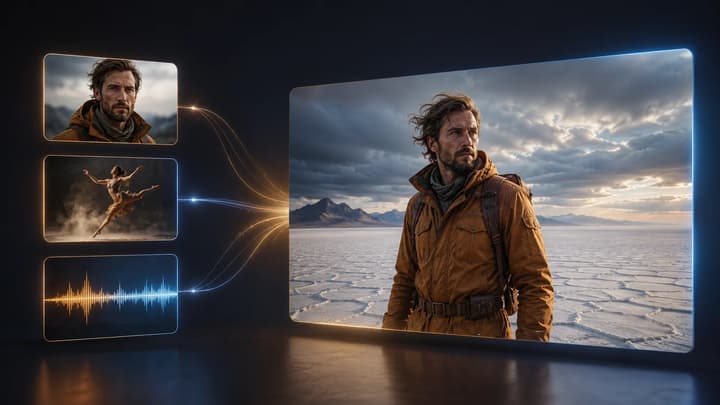
To turn audio into a generated video, choose an audio-compatible model, upload a short recording and a clear image, then describe one visible action. Match the framing and duration to that action and review the whole result with sound.

Keep a copy of the original recording. Audio references can influence what the model generates, including its soundtrack. If the exact words, performance or mix matter, compare them carefully and use the original audio in your final edit.

From a recording to a usable shot

  1. Step 01 Trim one complete moment

    Choose a tap, a short spoken phrase or one musical passage. Export an MP3 or WAV within the selected model's limits, with a little room around the action. A clean excerpt makes it easier to hear what changed.

  2. Step 02 Choose a picture that can support the action

    Keep the important face, hands or object visible. For a vocal performance, leave the face and shoulders clear. Additional references should supply a specific detail, such as clothing or the location.

  3. Step 03 Write the movement and the camera separately

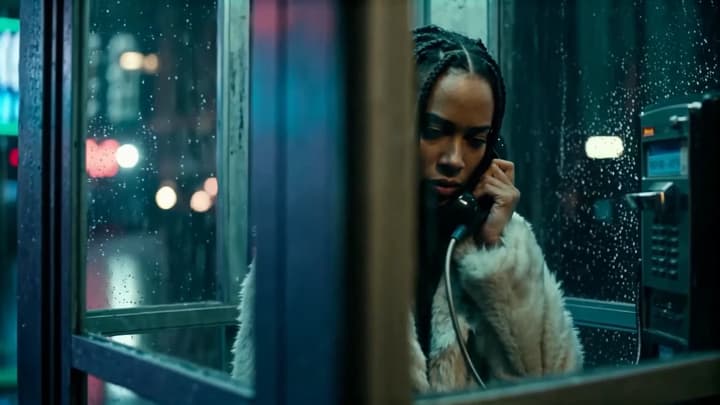
    Say what the subject does, how the audio should guide it and what the camera does. For the phone-booth example, ask for a short conversation and a gentle camera move. Leave competing actions out of the first brief.

  4. Step 04 Choose the length and frame

    Open Audio to Video, add the prepared files and select a supported short duration. A landscape reference suits 16:9. Use a portrait composition for 9:16. Review the displayed credits before generating.

  5. Step 05 Check the take and revise one cause

    Listen to the audio reference, then play the result at normal speed. Compare the opening, middle and ending for changed identity, unclear contact or altered sound. Re-edit restores the original inputs so you can simplify the prompt or replace one reference.

Make the inputs work together

A practical first setup

Audio
One clean excerpt with a clear event or phrase
Listen for noise, clipping and an abrupt ending.
Visual reference
One clear view of the subject and setting
Show the body parts and objects needed for the movement.
Prompt
One action and one camera setup
State which image defines each important detail.
Duration
A short supported length close to the excerpt
Leave room for the action to finish before the final frame.

Three briefs to listen to and watch

Compare the audio with the visible action. Load a brief to prepare its image, recording and prompt, then adjust one detail for your test.

A late-night call

Keep the caller and receiver in view. Compare the expression and speech with the recording. If the camera move hides the face, request a steadier view. Check the words separately when exact speech matters.

Visual reference

Audio reference

Video example
Suggested prompt

Use image 1 for the woman, pale coat and rain-covered phone booth. In one medium shot, show her speaking into the receiver with a restrained expression, guided by the uploaded voice and rain. Keep the neon lighting and use a gentle camera move.
Load this example

Clay on the wheel

Watch the rim and fingers while listening to the wheel. Keep the camera still if the close view makes the bowl difficult to track. Preserve the same reference while changing only the requested hand movement.

Visual reference

Audio reference

Video example
Suggested prompt

Use image 1 for the potter's hands, clay bowl and studio. Keep a close view as the hands gently shape the turning rim. Let the soft wheel and clay sounds guide the pace. One continuous shot with natural light.

Load this example

A vocal phrase

Keep the face visible and compare the expression with the vocal phrase. If gestures distract from the performance, request less movement. Check the words and generated sound separately against the source excerpt.

Visual reference

Audio reference

Video example
Suggested prompt

Use image 1 for the performer, warm-toned suit and sunlit hall. In one close shot, show a short vocal performance guided by the uploaded audio. Preserve the face and outfit, keep gestures restrained and use a steady camera.

Load this example

What to change in the next attempt

Action feels disconnected
Too many actions or an unclear sound source
Name one audible event and its visible cause.
Face or object changes
Conflicting references or a tightly cropped subject
Use a clearer main image and name the details to retain.
Speech or music changes
The generated soundtrack against the original
Use the original recording in the final edit when fidelity matters.
Action ends abruptly
The excerpt and chosen output duration
Trim a complete event and leave a brief ending pause.
Frequently asked questions

Frequently asked questions

Which files can I upload?

Upload one MP3 or WAV excerpt and JPEG, PNG or WebP images. Follow the selected model's file-size and audio-duration limits.

Will the original recording stay exactly the same?

The model may change the sound or timing. If you need the recording unchanged, place your original audio under the downloaded clip in a video editor.

Does it synchronize every spoken word?

This workflow uses audio as a generation reference. Review mouth movement separately when making a speaking character. Word-by-word lip synchronization requires a dedicated workflow.

Try one sound-led shot